

Search for a Fluent Forms signature field and you’ll find the official answer fast: Fluent Forms doesn’t build one in. Not on the free plugin, not even on Fluent Forms Pro. Instead, the company behind it sells signature capture as a completely separate product — the Signature Add-On, currently $39/year for a single site — that you install and license on top of whichever Fluent Forms plan you’re already running.
That’s a different setup than most form plugins use, and it catches people off guard. You can be on Fluent Forms Pro, paying $55/year (intro pricing, renews at $79) for the full feature set, and still not have a signature field until you buy the add-on separately. If all you need is the signature pad, this guide covers the two ways to get one — buying the official add-on, or adding SignSnap instead — and the exact steps either way.
Does Fluent Forms Have a Signature Field?
Not natively, on any plan. Fluent Forms’ free version (the one on WordPress.org) doesn’t include it, and neither does Pro. Signature capture lives entirely in the standalone Signature Add-On, priced separately at $39/year for one site, $79/year for up to five, or $149/year unlimited.
That’s a deliberate split, not a missing feature — Fluent Forms’ own documentation notes the add-on works with the free version specifically so people who don’t want Pro can still buy just the signature piece. It’s flexible, but it also means signature capture is never actually “included” in anything you already pay for. You’re always buying a second license for it.
That’s the exact gap SignSnap fills: a signature field built into one plugin, with nothing extra to license.
Two Ways to Add a Signature Field to Fluent Forms
Option A: Buy the Official Signature Add-On
If you’re already deep in the Fluent Forms / WP Manage Ninja ecosystem — using FluentCRM, FluentBooking, or other products from the same company — the official add-on integrates natively and might be the simpler choice for you. It’s built on HTML5 Canvas, supports touch and mouse input, and saves signatures with the form entry.
Option B: Add SignSnap
If you don’t need a second plugin and a second license just for one field, SignSnap adds a signature field directly into Fluent Forms — free version included — as part of a single plugin that also covers seven other form builders. One install, one settings page, no separate add-on subscription to track and renew.
The rest of this guide covers Option B.
Before You Start
You’ll need:
- Fluent Forms installed and active (free or Pro — SignSnap doesn’t require either)
- SignSnap installed on the same WordPress site
- A form already built, or a few minutes to build one
No code, no separate signature license, no second checkout.
How to Add a Signature Field to Fluent Forms with SignSnap
Step 1: Install SignSnap
Install and activate SignSnap like any WordPress plugin. It detects Fluent Forms automatically and loads only that adapter — none of SignSnap’s code for the other seven supported plugins runs on your site.
Step 2: Drag the Signature Field into Your Form
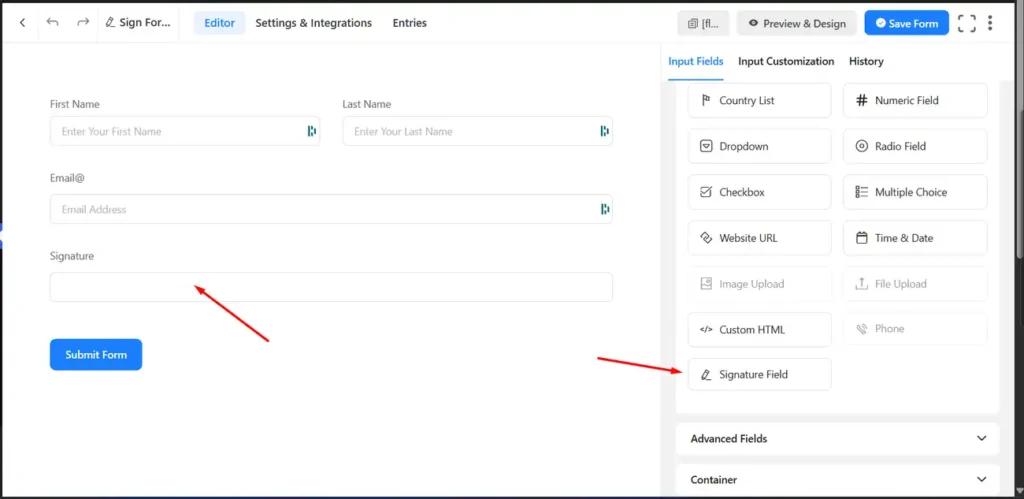
Open a form in the Fluent Forms builder. SignSnap’s Signature field appears in the field panel next to Fluent Forms’ own input fields. Drag it into your form layout the same way you’d add a text or dropdown field.
Step 3: Customize How the Pad Looks
SignSnap’s global settings page controls pen color, stroke width, and pad size/background across every form on your site, no matter which plugin built it. Set it once and it applies everywhere — you’re not reconfiguring per form.
Step 4: Test It, Then Publish
Sign the form on the front end with a mouse, trackpad, finger, or stylus — SignSnap treats all three the same on any modern browser, mobile included. Submit a test entry, confirm the signature appears with it, then publish.
What Happens to the Signature After Submission?
Every signature SignSnap captures saves as a real WordPress Media Library attachment — an actual image file, not base64 text stored in a database column. Alongside it, SignSnap logs a timestamp, IP address, and user agent for whoever signed.
That matters if the signed form needs to hold up as a real agreement rather than a UX nicety. Under the ESIGN Act and state UETA laws, an electronic signature generally needs to be attributable to the person who made it — which is why the audit trail matters as much as the drawing does. (Not legal advice — check with an attorney if a signed form needs to hold up contractually.)
Fluent Forms Signature Field: Cost Comparison
| Fluent Forms Free + Official Add-On | Fluent Forms Pro + Official Add-On | SignSnap | |
|---|---|---|---|
| Signature field included | No — separate purchase | No — separate purchase | Yes |
| Price | $39/year (add-on only) | $55/year (Pro, intro) + $39/year (add-on) = $94/year | $19/year, or $49 lifetime* (single site) |
| Separate products to manage | 2 (Fluent Forms + add-on license) | 2 (Fluent Forms Pro + add-on license) | 1 |
*SignSnap’s current pricing reflects an active promotion — check current pricing for up-to-date plans and coupon codes.
If a signature field is genuinely the only thing you’re after, SignSnap replaces a second product and a second renewal with one plugin you already installed.
Common Questions
Do I need Fluent Forms Pro to use SignSnap? No. SignSnap’s Fluent Forms integration works with the free version. You don’t need Pro, and you don’t need to buy Fluent Forms’ own Signature Add-On either.
Is this the same as Fluent Forms’ official Signature Add-On? No — that’s a separate product from WP Manage Ninja, sold and licensed independently of Fluent Forms itself. SignSnap replaces the need for it, and works across seven other form plugins too, which the official add-on doesn’t.
Does the signature field work on mobile? Yes. Touch, stylus, and mouse input all work identically.
Where does the signature actually get stored? As a WordPress Media Library attachment, with a logged timestamp, IP address, and user agent — not base64 text in a database row.
Can I use SignSnap on other form plugins too? Yes — SignSnap supports eight form plugin integrations total, including WPForms, Contact Form 7, Elementor Pro, MetForm, Formidable Forms, SureForms, and WS Form, all through the same engine and settings page.
What if I already own the official Signature Add-On? Then it already works fine with Fluent Forms — no reason to switch. SignSnap is for people who haven’t bought it yet and don’t want a second license just for one field.
Try It Before You Install It
Test SignSnap’s signature pad — pen color, stroke width, pad size — on the live demo, no install required.